Symbol List
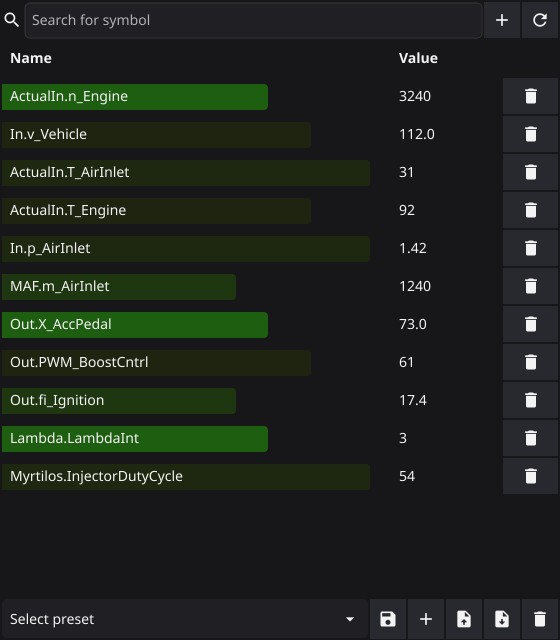
The symbol list is where you pick what txlogger reads from the ECU. Everything in this list is polled while logging, plotted in the live plot, and written to the log file — nothing else is. Open it with the Symbol list button in the toolbar.
Symbols come from the binary you have loaded — File → Open → Open binary, or drag a
.bin onto the window. Without a binary you can still load presets, but you can not
look up new symbols.
Adding and removing symbols
Type at least three characters in the search field at the top and a list of matching symbols from the binary drops down. Pick one, then press the + button to add it. Only symbols of 8 bytes or less show up — bigger ones are maps and tables, which belong in the map viewer, not the logger.
The ↻ button next to it re-reads every listed symbol from the currently loaded
binary and updates its address, length, type and correction factor. Use it after
loading a different binary: a preset saved against one ECU tune carries stale
addresses, and syncing fixes them without you having to rebuild the list. The debug
log reports how many symbols were matched, so Synced 12 / 18 symbols means six
names do not exist in the binary you have open.
The trash button on each row removes that symbol from the list.
Live values
While logging, each row shows the symbol’s current value. The coloured bar behind the name shows where that value sits between the lowest and highest reading seen so far: green and short near the bottom of the range, red and full width at the top, rescaling whenever a new extreme arrives. It is a quick way to see which channels are moving and which are pinned.
Turn the bars off under Settings → Value bars in symbol list if they cost you too much on a slow machine; the numbers keep updating, and the bars appear or disappear straight away without reopening the window. The bar colours follow the colourblind mode you pick in Settings, same as the map viewer.
Presets
The row along the bottom saves and restores whole symbol lists. txlogger ships with T5 Dash, T7 Dash, T7 Dash+Boost and T8 Dash, which cover the channels the dashboard needs for each ECU. The last preset you used is remembered per ECU and re-selected when you switch between T5, T7 and T8.
From left to right, the buttons are:
- Save — overwrite the selected preset with the current list. With no preset selected it asks for a name instead.
- New — save the current list under a new name.
- Export — write the current list to a
.txpfile to share or back up. - Import — load a
.txpfile into the list. - Delete — remove the selected preset. The four built-in presets can not be deleted.
Your own presets are stored in txlogger’s settings, not as files, so they survive an upgrade. Use export if you want to move them to another machine.